Helping Local Businesses With Marketing, Automations, and AI

Local SEO Blueprint to Rank on Google
Everything On How to Rank on Top of Local Search Results
This Blueprint is a complete guide to everything that helps a local business rank at the top of Google Local Search and other search engines. It’s comprehensive and continually updated, so check back regularly to stay current with the latest strategies and best practices.
Jump to
How Google and other Search Engines Ranks Your Business Profile
Distance (proximity): How close your business is to the person searching, which heavily influences local Google rankings.
Relevance: How well your business information and website match what someone is searching for.
Prominence: How well-known and trusted your business appears online through reviews, links, and mentions.
Consistency: How accurately and uniformly your business name, address, and phone number appear across all platforms.
Engagement: How people interact with your business online: clicks, calls, reviews, time spent on your site, etc, all signal trust to Google.
Website SEO: How well your website is optimized to rank higher on Google by using strong content, structure, and keywords.
Optimize Google Business Profile (GBP)
Google Business Profile must be claimed, 100% complete, and optimized. Here are the actions you should perform so your GBP is optimized:
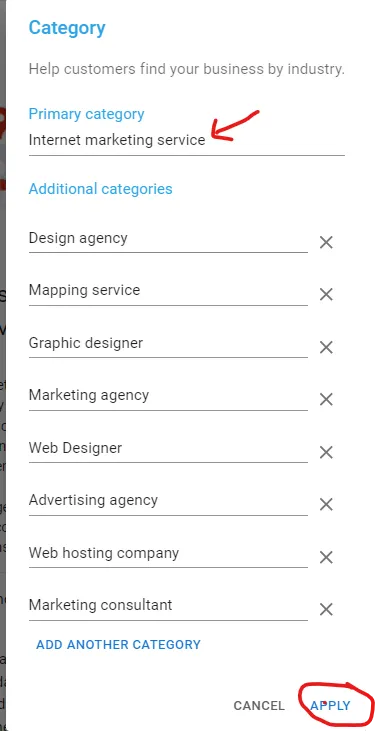
Choose the right primary category (important):
Use GMB Everywhere (chrome extension tool) to reveal the winning primary category in your niche, then plug it into your own Google Business Profile.
Make sure the primary category is the most relevant and specific to your business. For example, if you are a personal injury lawyer, select a primary category personal injury law firm, not the general law firm.
Make sure the primary category is the most relevant and specific to your business. For example, if you are a personal injury lawyer, select a primary category personal injury law firm, not the general law firm.
Pro tip: You can change your primary category based on the season. For example, in winter, when you’re offering snow shoveling, you can set Snow Shoveling as your primary category. Then in summer, switch it to a service like Lawn Care, Landscaping, or Pressure Washing to better match what customers are actively searching for and maximize visibility year round.
Add as many secondary categories that are relevant to your business: The primary category should describe your main service, but secondary categories are just as important because they expand your visibility into related searches. Google allows up to 10 total categories, yet most businesses only use one or two, which limits their reach.
Write a keyword-rich business description including what your business does + your main service area: Writing a keyword-rich business description that clearly explains what your business does and where you serve helps Google understand exactly who your business is relevant for. Here are some examples of how to write them:
Example 1: Summit Roofing is a professional roofing contractor serving Los Angeles and the San Fernando Valley, specializing in roof repair, roof replacement, and new roof installation. We provide residential and commercial roofing services, including shingle, tile, and flat roof systems designed for long-term protection. Our team proudly serves Van Nuys, Sherman Oaks, Encino, Burbank, and surrounding Los Angeles communities. Whether you need emergency roof repairs, storm damage restoration, or a full roof replacement, we deliver reliable workmanship and dependable service.
Example 2: Harbor Street Bistro is a neighborhood restaurant serving New York City, offering fresh, made-from-scratch dishes for lunch and dinner. We specialize in modern American cuisine with seasonal ingredients, handcrafted cocktails, and a welcoming dining atmosphere. Our restaurant proudly serves guests from Manhattan, Brooklyn, SoHo, Tribeca, and surrounding NYC neighborhoods. Whether you’re dining in, meeting friends, or ordering takeout, Harbor Street Bistro delivers great food, attentive service, and a memorable dining experience.
Example 3: Elite Core Fitness is a professional personal training service serving Miami, specializing in one-on-one training, weight loss coaching, and strength and conditioning programs. We work with clients of all fitness levels, offering customized workout plans, accountability coaching, and functional training. Our personal trainers proudly serve Miami Beach, Brickell, Coral Gables, and surrounding South Florida communities. Whether your goal is fat loss, muscle building, or improved performance, we help you achieve lasting results.
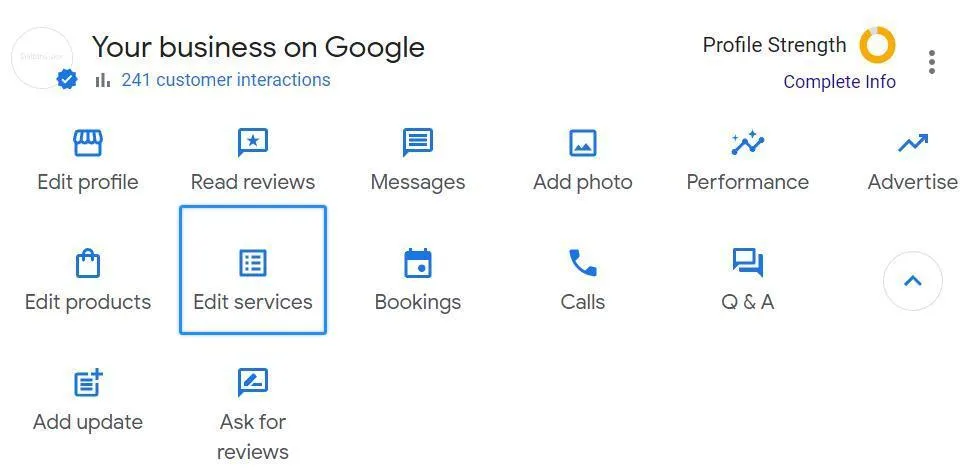
Add a comprehensive list of 20–30 services (if you have them) your business provides to your Google Business Profile. When adding services to your Google Business Profile, include the main service keyword, your city, and the neighboring areas you serve. Here are examples:
Example 1: Roof repair Los Angeles, Roof replacement Van Nuys, New roof installation Sherman Oaks, Emergency roof repair Burbank, Leak detection Encino, Storm damage repair Hollywood, Shingle roofing installation North Hollywood, Tile roofing repair Studio City, Flat roof installation Reseda, Metal roofing Los Angeles, Residential roofing Van Nuys, Commercial roofing Sherman Oaks, Roof inspections Encino, Preventative roof maintenance Burbank, Gutter installation Los Angeles, Gutter repair Van Nuys, Gutter cleaning Sherman Oaks, Skylight installation Encino, Skylight repair Hollywood, Roof coating & waterproofing North Hollywood
Example 2: Dine-in restaurant New York City, Takeout orders Manhattan, Online ordering Brooklyn, Delivery service Queens, Lunch menu Staten Island, Dinner menu Bronx, Weekend brunch Manhattan, Catering services Brooklyn, Private events Queens, Birthday parties Bronx, Corporate events Manhattan, Vegan menu options New York City, Vegetarian menu options Manhattan, Gluten-free options Brooklyn, Kids menu Staten Island, Happy hour specials Manhattan, Craft cocktails Queens, Wine selection Bronx, Outdoor seating Manhattan, Reservations Brooklyn
Upload 5–10 high-quality, geo-tagged photos to your Google Business Profile: Make sure each image includes location data and highlights your business, team, products, or services. Even if your photos were taken on-site, GPS data isn’t always automatically saved—so double-check before uploading. You can use apps or tools that embed precise location coordinates to ensure your photos are fully geo-tagged.
Post at least once per week on your Google Business Profile: Regular posts, such as updates, promotions, events, or new services keep your profile active, engage customers, and signal to Google that your business is active, which can help improve your local search rankings.
Collect and respond to reviews regularly: Aim to get 1–3 reviews per week, and encourage customers to leave detailed reviews mentioning specific services and locations naturally. Google favors reviews that demonstrate relevance and engagement.
Add as many neighboring cities or service areas as possible in the Service Area section of your Google Business Profile: The Service Area section allows you to specify the geographic locations where your business provides services, beyond just your physical address. Adding as many neighboring cities, towns, or ZIP codes as possible helps increase your visibility in local search results
Fully complete your Google Business Profile by filling in every section: From business name, address, and phone number to services, hours, photos, and descriptions. Even the irrelevant questions like “Disability access” (Yes/No) should be filled out. A 100% complete profile improves trust with both Google and potential customers, maximizing your chances of ranking high in local search results.
Main Website Content and Page Structure For Local SEO
The next step is making sure your website is set up in a way Google actually understands. There are a few specific things that help Google easily crawl your site and clearly see what your business does and where you operate. When your site is structured properly, Google starts to see your business as more relevant and more trustworthy. And when that happens, Google tends to reward you with higher visibility in local search results.
Core Pages
To improve your Google rankings and maximize your business’s relevance and authority in local search results, most businesses benefit from having 20–40 pages on their website. This typically includes:
Main pages: 4–5 core pages, (home, about, contact, services, locations), that define your business.
Secondary category pages: One page for each category listed in your Google Business Profile (2–10 pages).
Individual service pages: A dedicated page for each service you offer (5–20 pages).
In addition, your website should the URL structure below or something similar:
Subcategory or additional category pages: example.com/[secondary-category]
Service pages: example.com/[secondary-category]/[specific-service]
Scale Pages
To expand your reach and scale, you would also create pages for the following:
Location pages (one for each major location): Each page acts as a central hub, highlighting all the services you offer in that specific location.
URL structure: example.com/[locations]/[location]
Location service pages (A page for every service + location): These pages focus on a specific service tailored to a particular location
URL structure: example.com/[service]/[location]
Internal Link Structure
Internal linking, the practice of connecting pages within your own website, is crucial for local SEO (and overall search rankings). But before we dive into how to do it, let’s first understand why it matters:
Pass Authority: Internal links help distribute “SEO power” from your strongest pages (like your homepage) to your service and location pages.
Improves Crawlability: Google’s bots discover and index your pages faster when they’re connected internally.
Reinforces Relevance: Linking between related services and locations tells search engines how your content is structured and related.
So, how should you link your pages?
Home page -> Main Category -> Service
What Content Should Each Page Have?
Home Page:
Your home page should clearly show who you are, what you do, and where you do it. Include your main keyword and city in your title tag, H1, and intro paragraph — for example: “Professional Roofing Company in Los Angeles, CA.”
Add secondary service categories as H2 sections, and write around 300–400 words describing each one.
Include internal links to your service and location pages, add your Google Map embed, and display your business name, address, and phone number (NAP) consistently. End the page with a strong call-to-action like “Request a Free Estimate.”
Mention your service areas naturally throughout the page.
Contact Page: Your Contact page should make it easy for both Google and customers to reach you. This is what your contact page should have:
Click-to-call phone number
Contact form
Embedded Google Map
NAP block
Service area mentions
CTA
About Page: Google’s local algorithm heavily favors real, legitimate businesses. An optimized About page helps Google confirm that. Here is what about page should have:
Business name, main service, and city in the first paragraph
Short story about how and why the business started
Photos of: Team, office, work being done (geo-tagged if possible)
NAP information (matching GBP exactly)
Embedded Google Map (optional but helpful)
Mentions of neighborhoods or nearby cities served
Internal links to: Services page, locations page, contact page.
Secondary Category Pages: This is a page you create for every secondary category you put into google (remember, there is main category, then there are secondary or additional categories).
List every service (all the ones you input in Google Business Profile) as a header 2 tag and write about 300 words for each, including your main keyword and city naturally within the text (for example, “Roof Repair in Los Angeles”).
Link each service description to its own dedicated service or location page and include a clear call-to-action at the bottom of each section to drive inquiries.
Include schema markup: Add Service schema for each listed service to help Google understand and display your offerings in rich search results.
Connect to location relevance: Mention the main city and surrounding areas naturally throughout the content to reinforce your local SEO signals.
Service Pages: For each service page, you need to be specific about
H1 Tag: The h1 for each service page should be [service name] + [main location name].
Content:
How long service takes?
Why people need this service? What problems does it solve?
What to expect or the step by step process.
Location Service Pages
List every service as a header 2 tag and write about 300 words for each, including your main keyword and city naturally within the text (for example, “Roof Repair in Los Angeles”).
Link each service description to its own dedicated service or location page and include a clear call-to-action at the bottom of each section to drive inquiries.
Include schema markup: Add Service schema for each listed service to help Google understand and display your offerings in rich search results.
Connect to location relevance: Mention the main city and surrounding areas naturally throughout the content to reinforce your local SEO signals.
Locations Hub Page: Your main Locations Page acts as the central hub that connects all your individual city or neighborhood pages. It helps Google (and visitors) easily navigate to the areas you serve, while strengthening your local SEO authority across every region you target. Best Practices:
Start with a short intro paragraph explaining your overall service area and what you offer — for example: “We proudly serve homeowners and businesses across Los Angeles County, including Burbank, Sherman Oaks, and Pasadena.”
List each location you serve with links to its dedicated city page (e.g., “Roofing in Los Angeles,” “Roofing in Burbank”).
Include a brief summary (1–2 sentences) under each city name describing what you do there, such as: “Our Burbank roofing team specializes in roof repairs and full replacements for homes and businesses.”
Add an interactive map showing your service coverage or business locations.
Mention nearby regions or counties you serve to expand local reach.
Include internal links back to your Home and Services pages for context and authority flow.
End with a call-to-action encouraging visitors to contact the nearest branch or schedule a quote (e.g., “Find your city below and request a free estimate today!”).
Pro Tip: Keep this page regularly updated as you expand into new areas — Google rewards freshness and accuracy in local content.
Embed map in footer: When a Google Map is included in the footer, it appears on every page automatically, which signals to search engines that your business is tied to a specific geographic area, strengthening your local relevance. It also improves user experience, allowing visitors to quickly find directions or confirm your address without searching elsewhere, which can increase engagement and trust. Additionally, the map can contribute indirectly to SEO by encouraging clicks, visits, and interactions, all of which are behavioral signals that Google may consider when ranking local businesses.
Informational Pages and Blogging
Blogging for local SEO is different from regular blogging. You’re not trying to go viral or write content for everyone on the internet. The goal of a local SEO blog or informational page is to answer the exact questions people in your area are already searching for and to support your main service pages. It helps Google understand what you do and where you do it, and it helps potential customers feel confident choosing you. Done right, this kind of content brings in the right traffic—people who are actually looking to hire a local business, not just read an article.
General Rules
Make the first paragraph answer search intent or question immediately: Your approach of answering the searcher’s question immediately in the first paragraph is excellent for local SEO because it directly satisfies user intent, which Google prioritizes for ranking. Here is what the first paragraph of each question should have.
Question: Where can I find a reliable plumber in Houston?: If you need a reliable plumber in Houston, TX, you’ve come to the right place. We offer expert plumbing repairs, water heater installations, drain cleaning, and 24/7 emergency services for homes and businesses across Houston.
Question: Do you need a permit to do roof replacement in Los Angeles?: Yes — in Los Angeles, you need a permit for roof replacement to ensure your project meets building codes and safety standards. Our experienced team handles the entire permit process, so your roof replacement in Los Angeles and surrounding areas like Burbank, Sherman Oaks, and Pasadena is completed safely, legally, and on schedule. Schedule a free consultation today to get started.
Question: How do I get rid of termites in Dallas, TX?: Dealing with termites in Dallas, TX? The fastest and most effective way to get rid of them is with professional termite treatment. Our expert team provides thorough inspections, targeted extermination, and ongoing prevention plans to keep your home protected year-round.
Create Content Around Questions that Lead to Purchases
The first objective is to find out what questions people are asking that actually lead to sales. We don’t want broad, informational questions like “how to fix a kitchen sink” or “what tools do plumbers use.” Those searches are usually coming from DIYers, not buyers. We want questions that signal intent questions asked by people who are actively considering hiring a professional.
On top of this, we want to integrate local relevance into our questions. Because local relevance tells us what people are actually searching for in our area, not just what works nationally or globally. People often include their city, neighborhood, or nearby landmarks when they’re ready to hire, so if our content answers those locally-specific questions, we attract high-intent leads who are ready to buy from a business nearby.
Here are some questions that target people who are ready, or seriously considering, buying, and that small local businesses can create content around:
For Home Services (Plumbing / Roofing / HVAC)
How much does it cost to replace a roof in [city]?
Best roofing contractors in [city]
Is it better to repair or replace a roof?
How long does a roof replacement take?
What questions should I ask a roofing contractor before hiring?
Emergency plumber vs scheduled service — what’s the difference?
Signs I need a professional plumber instead of a DIY fix
Restaurants
What are the best restaurants for date night?
Top Italian restaurants in [city]
How much should I expect to spend for dinner for two?
Best family-friendly restaurants in [city]
How do I know if a restaurant has good hygiene and food quality?
Best brunch spots in [city]
What are the most popular local dishes to try at restaurants?
Consultants (Business / Marketing / Financial)
How much does a marketing consultant cost for a small business?
Best business consultants in [city]
How do I know if I need a consultant or can do it myself?
Top financial consultants in [city]
What questions should I ask a consultant before hiring them?
Best HR consultants in [city]
How do I measure ROI from hiring a consultant?
As you can see, these questions have buying intent and local relevancy.
Here are some tools to find questions people are asking about your industry and in your area:
1. Google Search (People Also Ask)
Search a keyword like “roofing [city] cost” and scroll to the People also ask box. This shows real questions people frequently search related to your topic and location.
2. Google Autocomplete
Type a query like “best plumber in [city]” into Google and see the suggestions that pop up. These are actual searches people are typing in your local area.
3. AnswerThePublic
Enter a keyword plus a location (like “HVAC + [city]”) and get a visual map of real questions people search online. Very useful for uncovering who/what/where/when queries.
4. Keywords Everywhere
This browser extension shows search volume, related questions, and “people also ask” data right in your Google search results.
5. SEMrush / Ahrefs
These SEO tools have Questions reports in keyword research that let you filter for question-based search queries — and you can often narrow down to local search variations when you add a city or region in your seed terms.
6. Moz Keyword Explorer
Moz will show you keyword suggestions and SERP analysis, including question-form phrases and local modifiers (e.g., “near me”, “in [city]”).
7. Google Trends
Good for spotting rising search queries regionally. You can compare interest over time for different local question variations.
8. AlsoAsked.com
Pulls from Google’s “People also ask” data to show what questions are connected to a seed term. Put in “[service] in [city]” to see related local intent questions.
9. Reddit & Local Forums
Search subreddits like r/LosAngeles or local Facebook groups for questions people ask about services in your city. These are real consumer queries that you can turn into content topics.
10. Yelp & Google Business Q&A
Look at the questions and answers section on your competitors’ business listings. People often ask pricing, services, and comparison questions that make great blog topics.
11. Quora and reddit
Search for industry questions from people mentioning your city. E.g., “plumber in [city]” + “cost”.
12. Local Facebook Groups
People ask questions like “Who’s the best dentist near me?” all the time. These are great signals of local intent.
Link the blog post to your service pages
Whenever you write a local SEO blog, you want it to actually help your business, not just get read. Linking your blog to your service pages does exactly that. It guides readers who found your post through Google straight to the page where they can hire you, book a service, or get a quote. Here are examples of how you can do that in your blogging.
1. Fitness / Personal Training
Blog Post: “5 Common Mistakes People Make When Trying to Lose Weight in [City]”
Links to Service Pages:
“If you want a custom workout plan, check out our Personal Training Programs page.”
“Learn more about our Nutrition Coaching services to get results faster.”
2. Coffee Shop / Café
Blog Post: “The Best Ways to Brew Coffee at Home Like a Barista”
Links to Service Pages:
“Come try our signature Espresso Drinks made fresh daily.”
“Check out our Coffee Subscription page to get beans delivered straight to your door.”
3. Mini Store / Convenience Shop
Blog Post: “10 Quick Snacks to Grab on Your Way to Work in [City]”
Links to Service Pages:
“Find all these snacks and more in our Store Inventory page.”
“Looking for fresh sandwiches? See our Prepared Foods selection.”
Last Note Don’t hard sell—but guide them
Last note: Don’t hard sell in your blog. Your goal isn’t to shove a service in someone’s face, it’s to guide them. Give helpful information, answer their questions, and naturally point them toward your service pages so they know where to go if they’re ready. Think of it like showing the path instead of forcing them down it.
Off-Page SEO for Local Businesses: Building Authority, Trust, and Local Relevance
Off-page local SEO is all the things you do outside your website to show Google that your business is trusted, credible, and relevant in your local area. Unlike on-page SEO, which is about what’s on your site (like content, keywords, and meta tags), off-page SEO is about how other sites, directories, and people talk about you. Here's what you can do for off-page local SEO:
Social Media Posting and Engagement
Today, people are finding local businesses in far more places than just Google.
Many consumers now search on platforms like Facebook, Instagram, TikTok, and YouTube to discover, research, and validate local businesses before making a decision. In many cases, they’ll see a business on social media first, then search for that business by name on Google to learn more, read reviews, or get directions.
Google has clearly picked up on this shift in behavior. Search results increasingly surface social content such as videos, profiles, reviews, and discussions—especially when people are actively engaging with or talking about a local business online.
While posting on social media does not directly “rank” your business higher, it creates powerful indirect signals that support local SEO. When people discover you on social platforms and then visit your Google Business Profile or website, Google sees real user engagement: clicks, calls, direction requests, and brand searches. These signals tell Google that your business is relevant, trusted, and in demand.
Social media also increases brand awareness and brand-name searches, which are strong indicators of legitimacy in local search. The more people recognize your business, search for it by name, and interact with your listings, the stronger your overall local presence becomes.
In short, social media helps you get in front of customers earlier in the decision-making process, drives qualified traffic to your Google Business Profile and website, and reinforces the engagement signals that help your business stand out in local search results.
Citations & Directories
Make sure your business is listed on local directories like Yelp, Angie’s List, HomeAdvisor, and Yellow Pages with consistent name, address, and phone number (NAP).
Focus on quality over quantity. Listings on credible, relevant sites matter more than dozens of random citations. Industry-specific directories are especially powerful.
Check niche-specific directories in your industry. Listings on niche sites related directly to your services often carry more weight than general directories because they clearly signal what you do and who you serve.
Backlinks
Local blogs, news sites, and community websites: Reach out to local bloggers or journalists for features or interviews.
Guest posts, sponsorships, and partnerships: Write guest posts for local or industry sites, or sponsor events to earn natural backlinks.
Local Chamber of Commerce: Joining your city’s (or nearby) chamber is one of the strongest local authority links you can get.
Manufacturer or supplier links: If you sell or install branded products, ask the manufacturer to list you as an authorized provider on their site.
Eco-friendly or niche directories: If your business has a green angle, submit to eco-friendly directories.
Community sites, schools, non-profits, or sports clubs: Participating in or sponsoring local events often comes with links back to your site.
Local awards websites: Apply for awards or recognitions—winning or being listed creates high-quality local backlinks.
Job boards or industry directories: Post openings or create business profiles on reputable local and niche boards.
Competitor Research
Check where top competitors in your area are getting mentions and backlinks using tools like Ahrefs or SEMrush. Look for opportunities to get listed on the same directories, local news features, or partnership sites.
Other Local SEO Optimizations
Keep Your NAP Consistent
Make sure your Name, Address, and Phone number (NAP) are identical across every online platform. Google sees consistency as a trust signal. When your Google Business Profile, website schema, and directory listings all match perfectly, it boosts credibility and strengthens your local SEO authority.
Include Your Address in the Footer
Adding your address to every page on your website reinforces your physical presence in a specific area. This helps Google connect your website to local searches.
Drive Visits to Your Google Business Profile (GBP)
The more people interact with your GBP, clicks, calls, directions, or reviews, the stronger the signals to Google. Higher engagement can improve your local rankings.
Make It Easy to Find You Offline
Create a QR code that links to your Google Business Profile and use it on door hangers, business cards, flyers, and other marketing materials.
Redirect Social Media Traffic to GBP
Instead of sending people directly to your website, point your social media profiles to your Google Business Profile. This helps increase GBP interactions, which Google values for local rankings.
Answer Calls Quickly and Don’t Miss Them
Google considers how well businesses engage with customers. Missed calls or slow responses signal poor customer service, which can negatively affect rankings.
Use AI and Automation to Improve Engagement
Tools like AI chatbots or AI voice systems can help answer questions, follow up with leads, and handle missed calls. These improve customer interactions and capture more leads, sending positive signals to Google.
Match Your Google Business Profile Exactly
Every detail in your website schema—business name, address, phone number, URL, and hours—should match your GBP character-for-character. Even small differences, like “Street” vs. “St.” or “Suite 100” vs. “#100,” can hurt your rankings.
(Optional/Risky) Add Keywords to Your Business Name
Some businesses add a primary service or location to their GBP name to rank higher. This can help locally, but be cautious—Google may penalize keyword stuffing or misleading names.
Keep Your Profile Fresh
Regularly add new posts and recent reviews to your GBP. Google values recency. Recent reviews, especially those mentioning different service areas, can help your profile rank in multiple neighborhoods.
Optimize Reviews for Local Keywords
Encourage customers to mention specific services, neighborhoods, or cities in their reviews. Google pays attention to keywords in reviews, which can help your business show up in searches across multiple areas.
Local Structured Data
Use schema markup for services, events, and reviews to help Google understand your business better.
Driving Directions to Your Business Location
Encourage employees, friends, family, and loyal customers to request driving directions to your business via your Google Business Profile. Every time someone does this, it sends a signal to Google that your location is real, active, and relevant. These “direction requests” are one of the behavioral signals Google uses to evaluate and boost your local ranking. The more authentic engagement your listing receives, the stronger it becomes, helping your business show up higher in local search results when potential customers are looking for services like yours.
Don't have time to do all this?
If you're looking for someone who can help you implement everything on this list, I'm here to help. Click the button below so we can set up a chat and get started right away.
COMPANY
SERVICES
LEGAL
FOLLOW US
Copyright 2026. Techno Will Marketing. All Rights Reserved.
Facebook
Instagram
LinkedIn
Youtube